Comprehensive Guide to Waterfall Diagrams: Design, Interpretation, and Application
In this guide, you will learn the fundamentals of waterfall diagrams, how to create and customize them, and the best practices for interpreting and presenting data through these visual tools. Whether you’re a project manager, analyst, or designer, this article equips you with the knowledge to harness waterfall diagrams for clear, effective communication.
What is a Waterfall Diagram?
A waterfall diagram, also known as a waterfall chart or cascade chart, visually represents sequential positive or negative contributions that lead to a final outcome. Originally popularized in finance for illustrating changes in net income, the format is now widely used in project management, product development, and data analysis to break down complex processes into discrete, additive steps.
Key Components of a Waterfall Diagram
Typical waterfall diagrams consist of the following elements:
- Start Bar – Represents the initial value or baseline.
- Intermediate Bars – Show incremental increases or decreases, often color-coded (green for positive, red for negative).
- Total Bar – Displays the final cumulative value after all adjustments.
- Connector Lines – Link bars to emphasize flow from one stage to the next.
Each bar’s height corresponds to its quantitative impact, and the vertical positioning ensures that the visual narrative flows naturally from left to right.
Designing a Waterfall Diagram – Step by Step
Creating an effective waterfall diagram involves careful planning and design choices:
- Define the Data Points – Identify the baseline, each adjustment, and the final outcome. Ensure the data are accurate and represent true increments.
- Choose a Color Scheme – Use consistent colors to differentiate positive and negative contributions. Accessibility considerations recommend high-contrast palettes for readability.
- Select a Charting Tool – Excel, Google Sheets, PowerPoint, and specialized software like Tableau or Microsoft Visio offer built-in waterfall templates.
- Insert Data – Input values in the order of the process flow. Most tools automatically calculate cumulative totals.
- Format Bars and Connectors – Adjust bar width, spacing, and connector style to match the presentation context. Add data labels for clarity.
- Annotate Key Milestones – Use callouts or icons to highlight critical events or decisions within the cascade.
- Review and Refine – Verify that the chart accurately reflects the intended narrative and adjust colors or labels if needed.
Below is an example waterfall diagram template that demonstrates the basic layout and color coding. This visual reference can serve as a starting point for customizing your own chart.
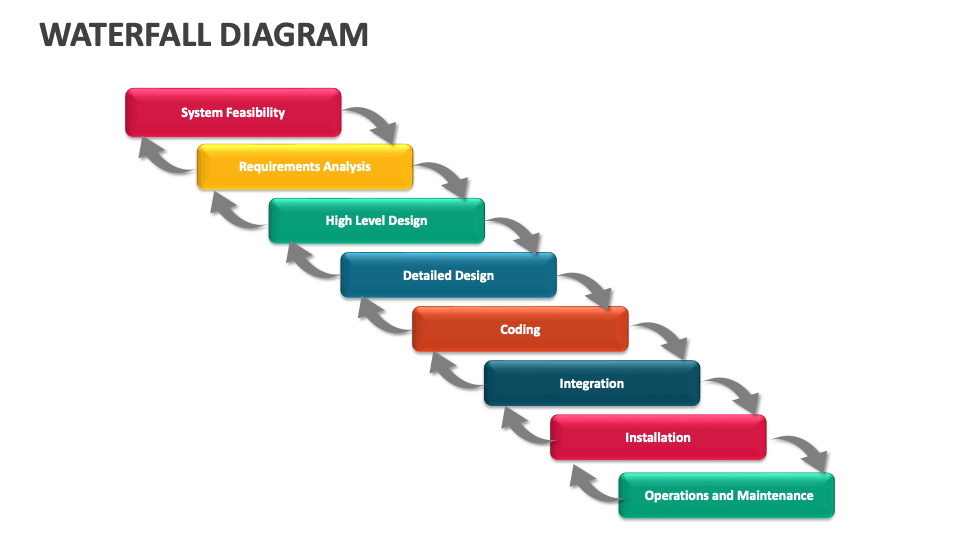
Common Variations of Waterfall Diagrams
While the standard waterfall chart is highly effective, variations exist to suit specific needs:
- Accumulative Waterfall – Accumulates changes from a fixed starting point, often used for cumulative cost analyses.
- Clustered Waterfall – Groups related bars within a single segment, helpful for comparing multiple related series.
- Stacked Waterfall – Stacks positive and negative bars within the same column, providing a more compact view.
- Negative-only Waterfall – Highlights reductions or losses exclusively, useful for budget variance studies.
Tools and Software for Creating Waterfall Diagrams
Numerous platforms support waterfall diagram creation, each offering unique features:
- Microsoft Excel – Built-in waterfall chart type with customization options for color and data labels.
- Google Sheets – Add-ons such as “ChartExpo” provide waterfall chart templates and advanced styling.
- Microsoft PowerPoint – Pre-designed templates enable quick insertion into presentations, especially with the “Insert Chart” feature.
- Tableau – Allows interactive waterfall visualizations, ideal for dashboards.
- Microsoft Visio – Offers diagramming capabilities for complex, multi-layered waterfall structures.
Interpreting a Waterfall Diagram
When reading a waterfall chart, follow these steps to extract insights:
- Identify the Baseline – Understand the starting value from which all subsequent changes are measured.
- Track Each Increment – Notice how each bar adds or subtracts from the running total; pay attention to the direction of change.
- Analyze the Final Total – Compare the final bar against expectations or targets to assess performance.
- Spot Outliers – Large bars indicate significant events that may warrant deeper investigation.
- Cross-reference with Narrative – Ensure that the chart’s storyline aligns with the textual explanation or report.
Use Cases in Project Management and Finance
Waterfall diagrams are versatile tools across many domains:
- Project Budget Tracking – Visualize cost inflations, savings, and overruns over project phases.
- Revenue Breakdown – Display incremental sales drivers and deductions to showcase net revenue.
- Process Optimization – Map steps in a workflow, highlighting efficiency gains or bottlenecks.
- Risk Management – Illustrate how mitigating actions impact overall risk exposure.
Best Practices for Effective Waterfall Diagrams
To maximize clarity and impact, adhere to the following guidelines:
- Simplicity is Key – Limit the number of bars to avoid clutter; combine minor items into an “Other” category if necessary.
- Consistent Scaling – Use uniform bar widths and spacing; avoid irregular scaling that can mislead.
- Readable Labels – Place numeric values inside or above bars; use bold fonts for totals.
- Color Accessibility – Choose colors that are distinguishable for color-blind viewers; pair color with texture or patterns.
- Contextual Footnotes – Add brief notes or hyperlinks to source data for transparency.
- Dynamic Updating – For live dashboards, link the chart directly to a data source for real-time updates.
Accessibility and Design Considerations
Ensure your waterfall diagram is inclusive by:
- Using high-contrast color combinations (e.g., navy on white, dark green on light yellow).
- Providing descriptive alt text for images: “Step-by-step waterfall diagram showing incremental changes leading to a final value.”
- Embedding keyboard-friendly navigation in interactive charts.
- Including a textual summary for screen reader users.
Troubleshooting Common Issues
When a waterfall chart seems off, consider these common pitfalls:
- Incorrect Data Order – Ensure the sequence matches the logical flow; misordering can reverse positive/negative impacts.
- Hidden Negative Values – In some tools, negative numbers may be rendered below the axis; confirm they are visible.
- Inconsistent Units – Mixing currencies or percentages within the
Labeled Waterfall Diagram At Anita Fortner Blog

Labeled Waterfall Diagram at Anita Fortner blog
Formation Of A Waterfall | How Do Waterfalls Form | How Waterfalls Are

formation of a waterfall | how do waterfalls form | how waterfalls are ...
Labeled Waterfall Diagram At Anita Fortner Blog

Labeled Waterfall Diagram at Anita Fortner blog
Diagram Of Formation Of A Waterfall - National 5 Geography - River

Diagram of Formation of a Waterfall - National 5 Geography - River ...
Waterfall Diagram PowerPoint Template | SketchBubble
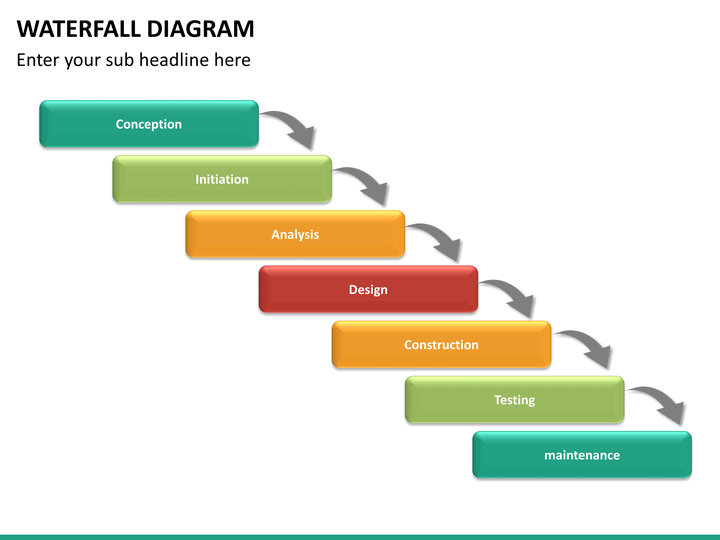
Waterfall Diagram PowerPoint Template | SketchBubble
Explain Waterfall Process Model – WYCK

Explain Waterfall Process Model – WYCK
Waterfall Formation

Waterfall Formation
Waterfalls Formation
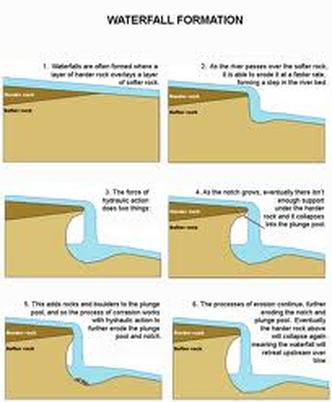
Waterfalls Formation
The Formation Of A Waterfall

The Formation of a Waterfall
Waterfall Diagram
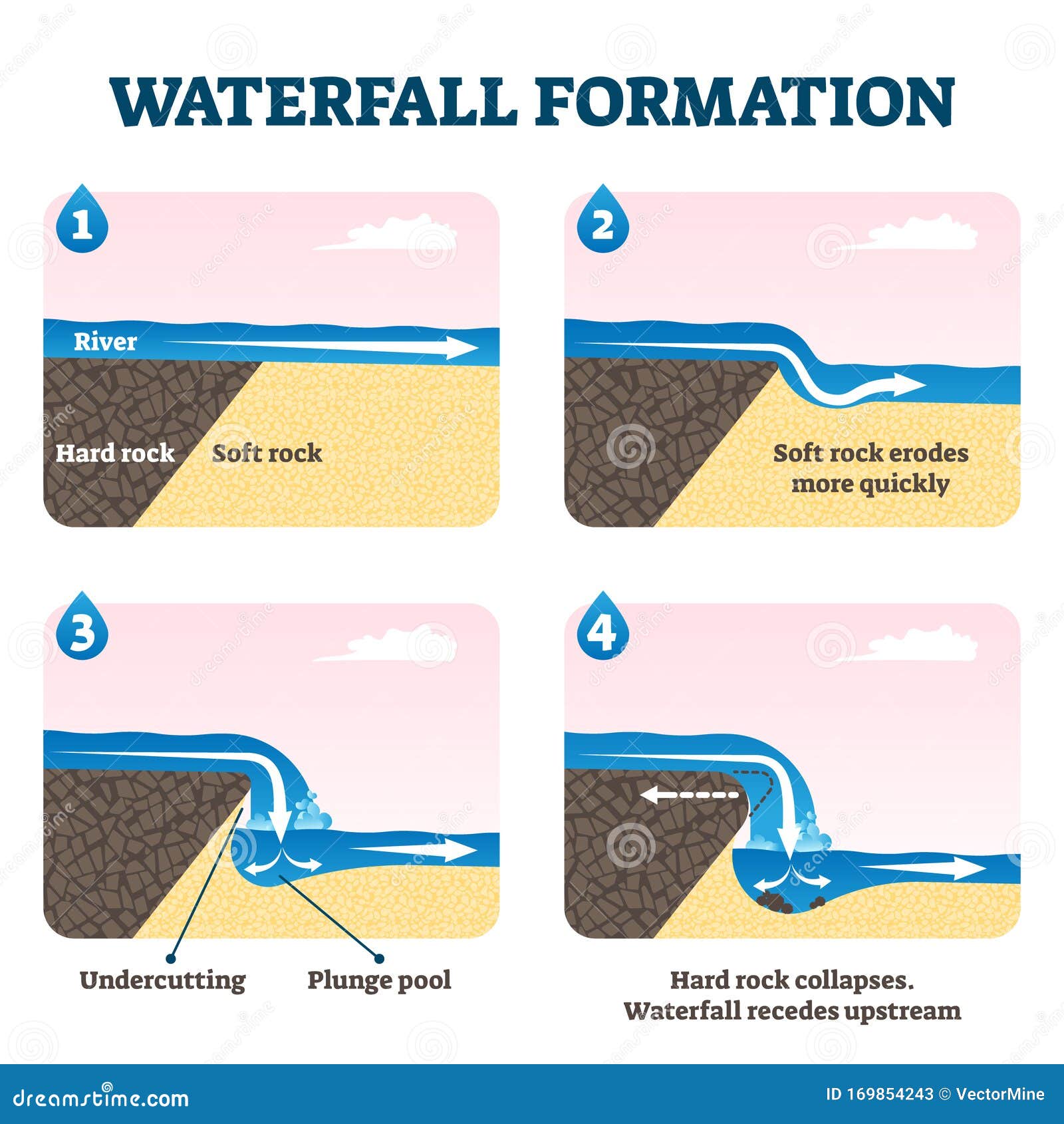
Waterfall Diagram
Diagram Waterfall Formation With Hard Soft Rock Royalty-Free Images

Diagram Waterfall Formation With Hard Soft Rock Royalty-Free Images ...
Waterfall Formation Animation
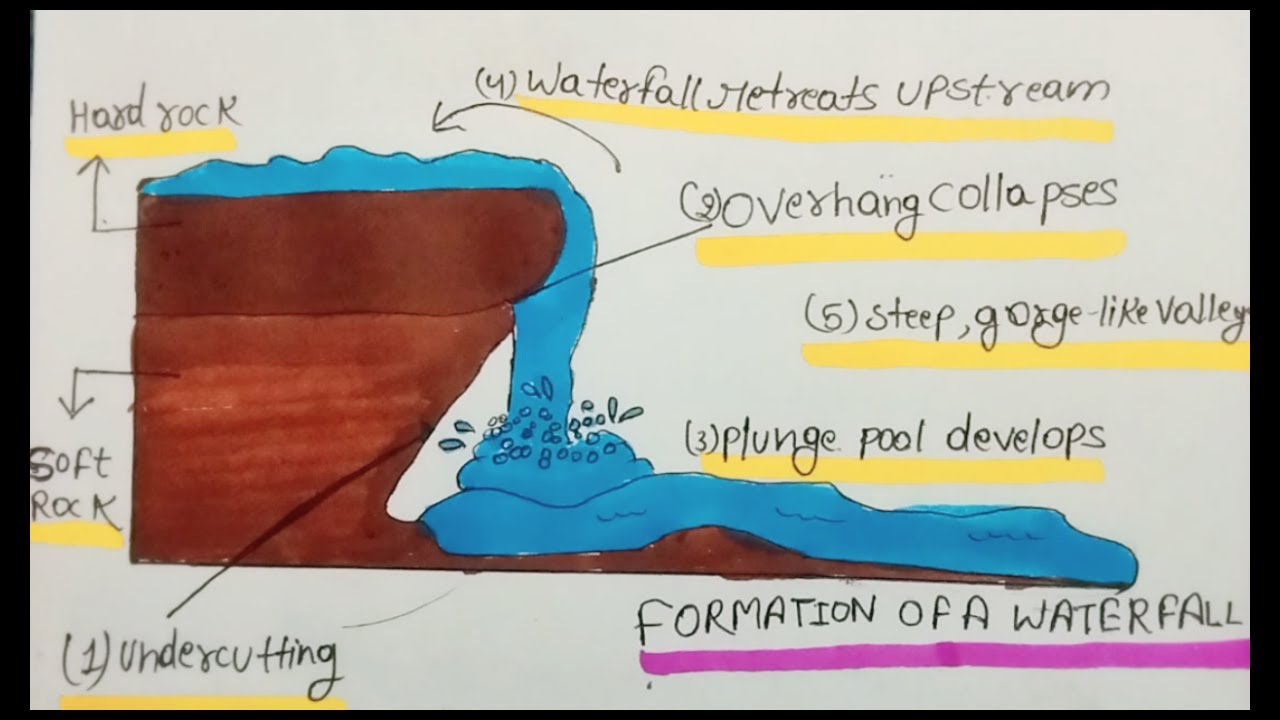
Waterfall Formation Animation
Waterfall Diagram Illustration - Twinkl
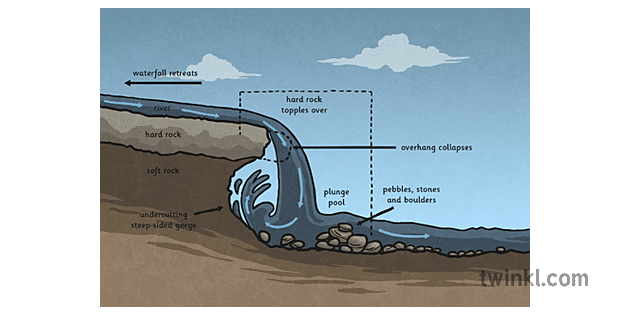
Waterfall Diagram Illustration - Twinkl
Diagram Of How A Waterfall Is Formed

Diagram Of How A Waterfall Is Formed
Waterfalls Formation

Waterfalls Formation
Waterfalls Formation
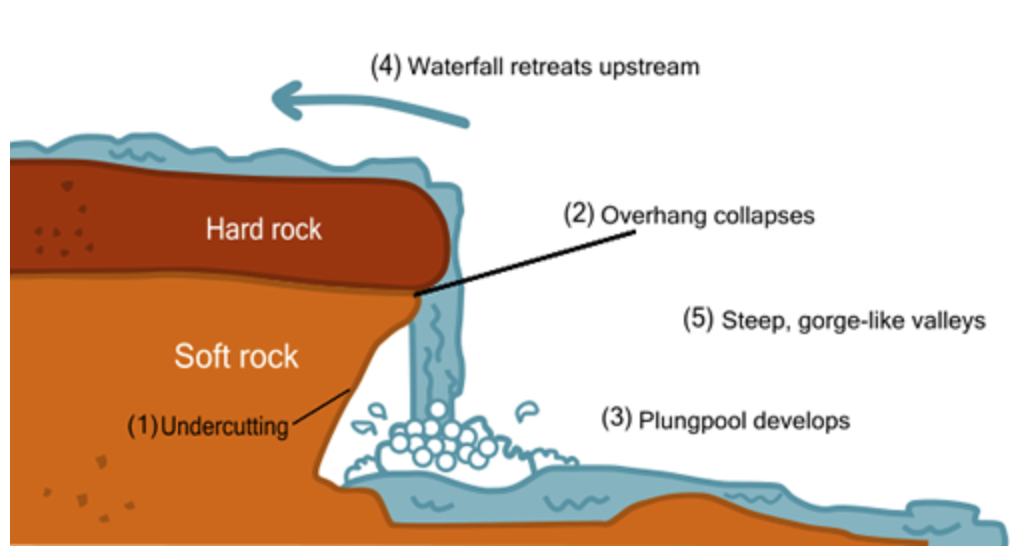
Waterfalls Formation
Waterfall Geography Examples At Maddison Joyce Blog
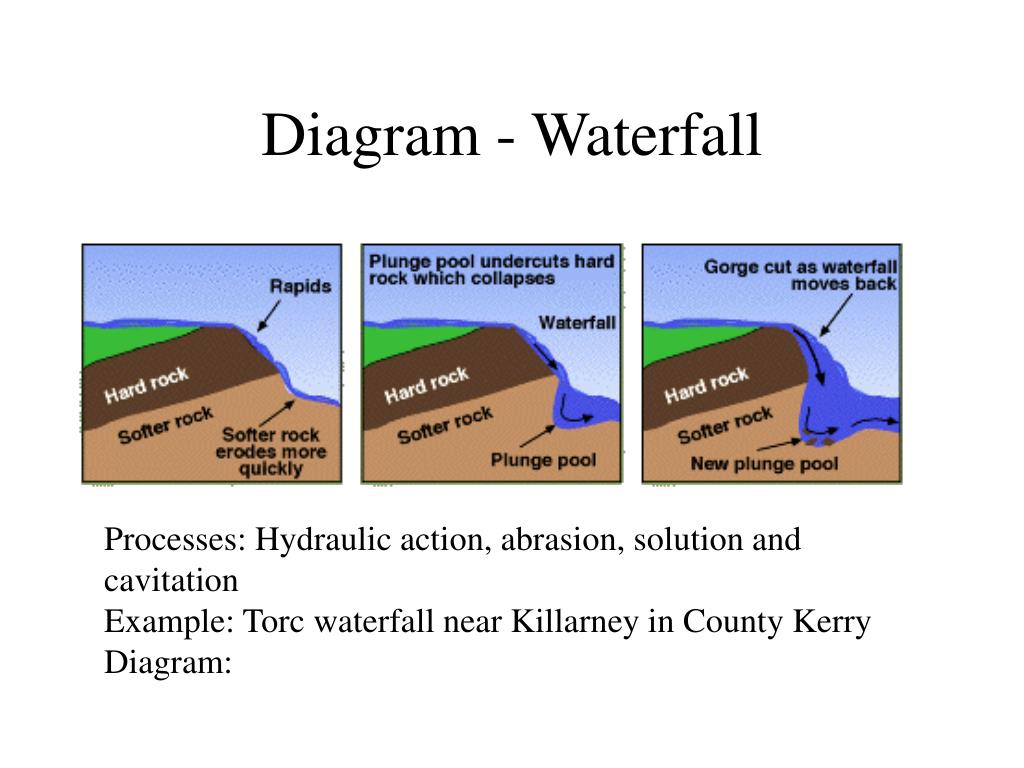
Waterfall Geography Examples at Maddison Joyce blog
Formation Of Rivers Landforms IGCSE Geography - Revision Notes

Formation of Rivers Landforms IGCSE Geography - Revision Notes
Stages Of A Waterfall Formation - Free Word Template
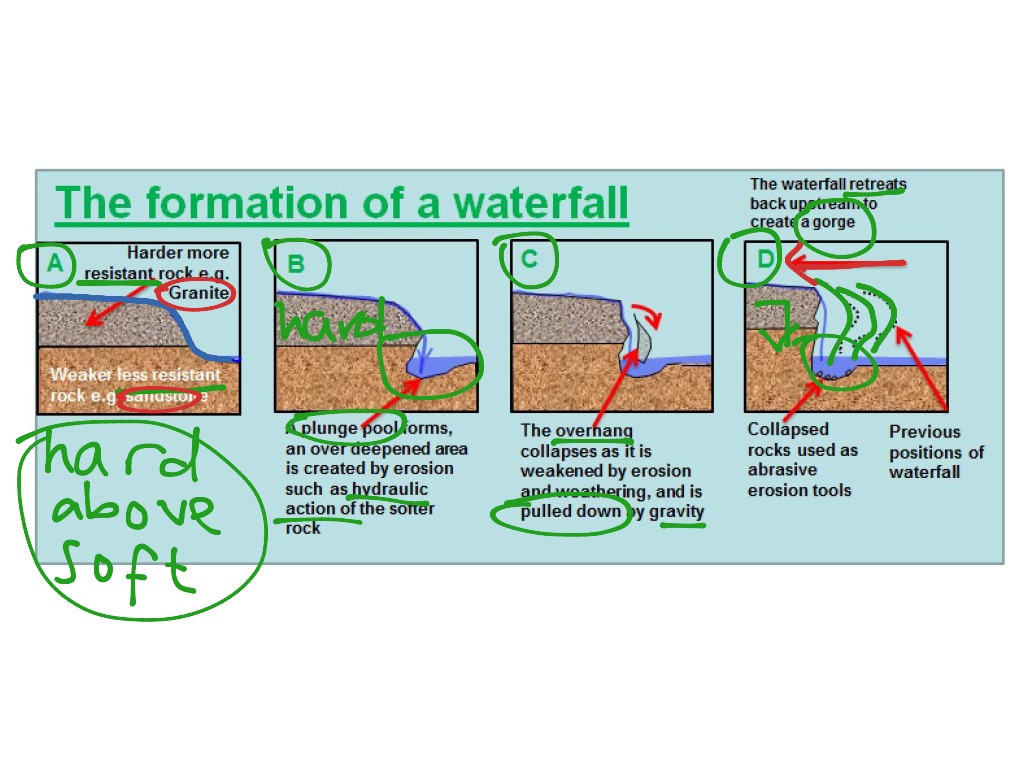
Stages Of A Waterfall Formation - Free Word Template
Waterfall Formation Diagram — Free Printable Diagram For Teachers
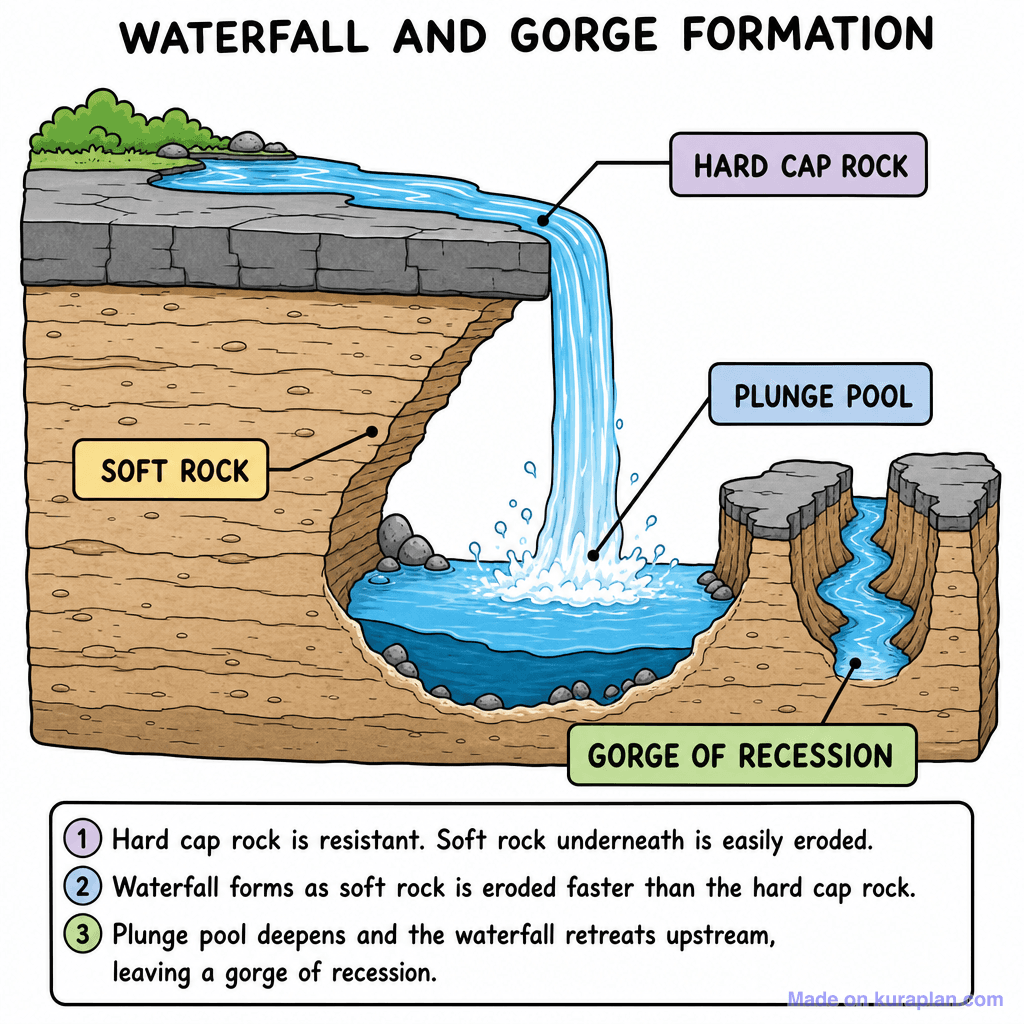
Waterfall Formation Diagram — Free Printable Diagram for Teachers ...
Diagram Of Waterfall Formation Diagram | Quizlet

Diagram of waterfall formation diagram | Quizlet
Diagram Of 5 Waterfall | Quizlet

Diagram of 5 Waterfall | Quizlet
What Is Step By Step Formation Of Waterfall? – ASEOD
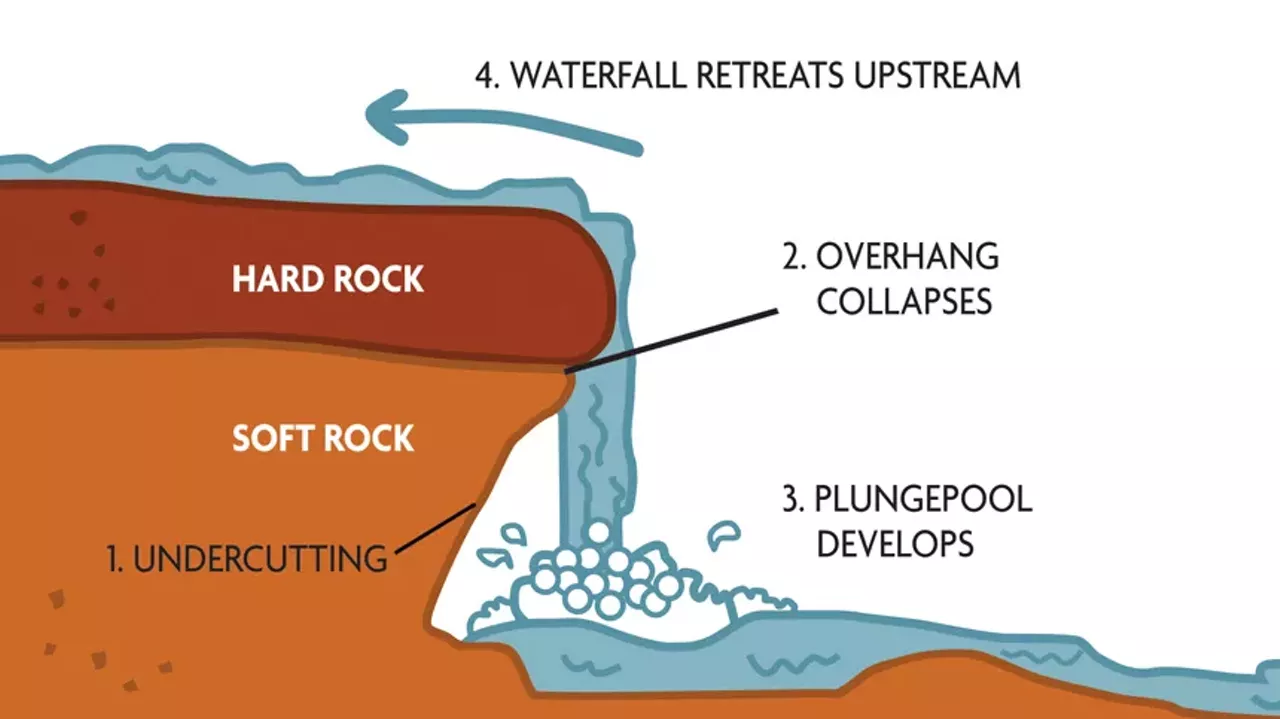
What Is Step By Step Formation Of Waterfall? – ASEOD
Waterfall Flow Chart Creating A Splash With Simple Waterfall Charts
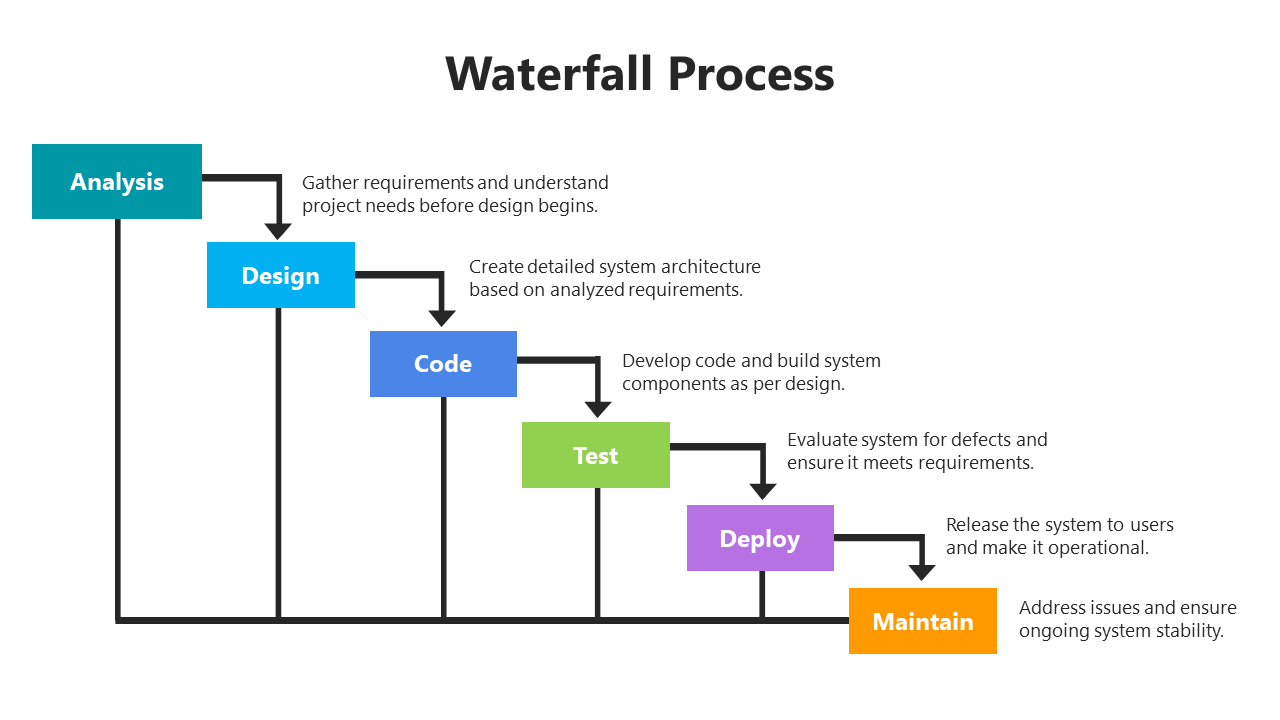
Waterfall Flow Chart Creating A Splash With Simple Waterfall Charts
Diagram Of Formation Of A Waterfall | Quizlet

Diagram of Formation of a waterfall | Quizlet
Draw A Diagram To Illustrate The Formation Of A Waterfall. - Internet

Draw a diagram to illustrate the formation of a waterfall. - Internet ...
Waterfall Diagram

Waterfall Diagram
Waterfall Flow Chart Creating A Splash With Simple Waterfall Charts

Waterfall Flow Chart Creating A Splash With Simple Waterfall Charts
Diagram Of How A Waterfall Is Formed

Diagram Of How A Waterfall Is Formed
Waterfall Methodology Ppt _ The Superfast Guide To Waterfall Chart [PPT
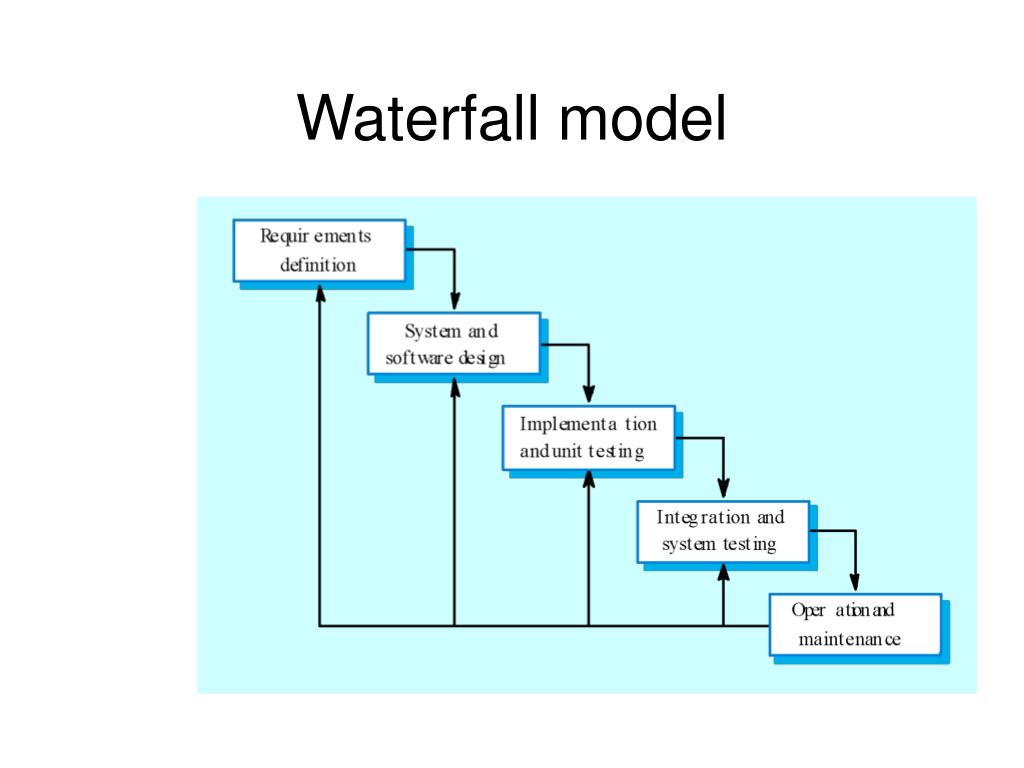
Waterfall Methodology Ppt _ The Superfast Guide to Waterfall Chart [PPT ...
1,439 Waterfall Diagram Royalty-Free Images, Stock Photos & Pictures

1,439 Waterfall Diagram Royalty-Free Images, Stock Photos & Pictures ...
Waterfalls Formation
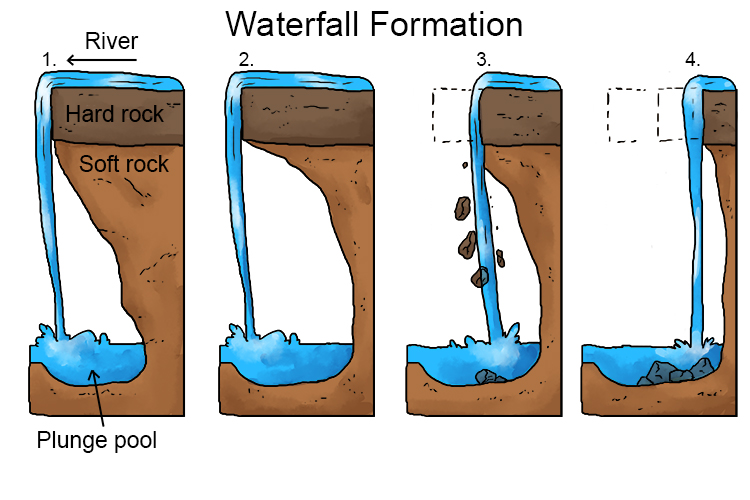
Waterfalls Formation
Labeled Waterfall Diagram At Anita Fortner Blog
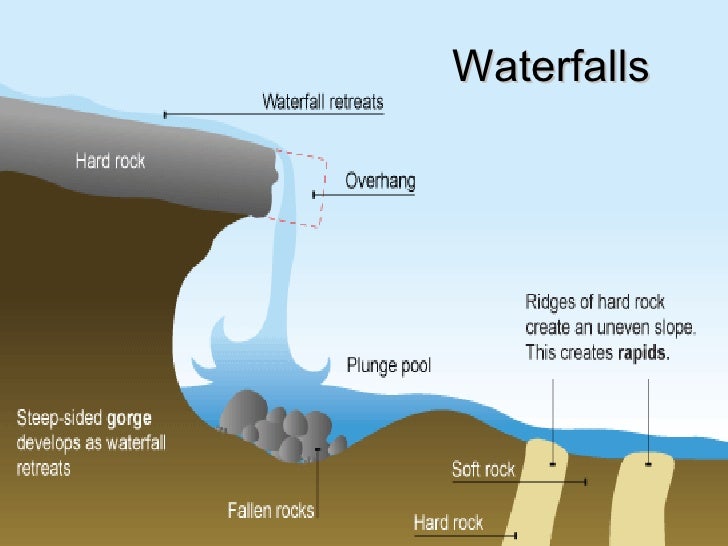
Labeled Waterfall Diagram at Anita Fortner blog
Waterfall Diagram

Waterfall Diagram